A written plan first. One workflow at a time. A person approves every output.
No platform to buy, no lock-in, no surprises. Here is the whole process, from the first call to the day your team runs it without us.
- Intro callStart
- AI AuditStep
- BuildStep
- Approval queueApproval
- HandoverResult
- Run, optionalStep
Four principles we do not bend
Human approval on every workflow.
Nothing is sent to a client, HMRC, an insurer or a regulator by software alone. Every build has a named approver and a queue.
Inside your tools, not instead of them.
Xero, QuickBooks, your practice software and your inbox stay where they are. We connect, we do not migrate.
You own everything.
Workflows run in your accounts, documentation is written for your team, and you can switch us off without losing anything.
Explainable to a compliance officer.
Each workflow has a one-page record: what data it touches, where it is hosted, who approves what, and how to stop it.
The process, step by step
Intro call
We check fit. If automation is not the right answer for your firm, we say so on the call.
AI Audit
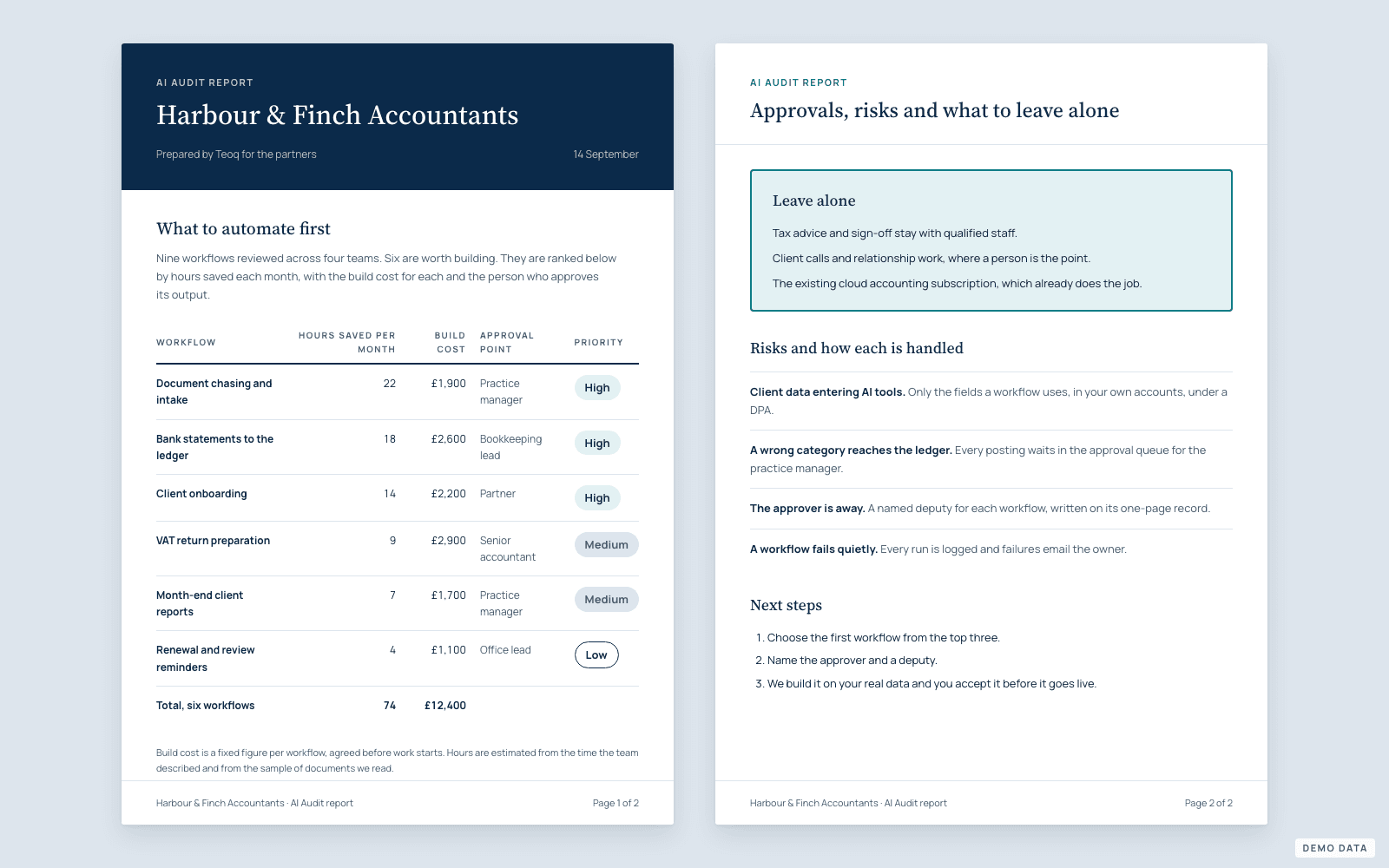
A 60-minute call, a read-only look at your tools, then a written report: ranked list of what to automate, hours saved per month, build cost, approval points and what to leave alone.
Build
One workflow at a time on n8n or Make, with error handling, logging and the approval step. You see it running on your real data before anything goes live.
Acceptance and handover
We walk your team through the workflow, the documentation and the "what to do if" page. You accept it before it is paid for.
Run
Monitoring, small changes, a quarterly review of what to automate next.
What changes for your team
Today
- Document arrives by email
- Someone saves and renames it
- Data typed into the accounting software
- Second person checks
- Client chased for the missing piece
- Filed, eventually
- 3 people
- 2 to 3 days
With a Teoq workflow
- Document arrives by email
- Extracted and validated automatically
- Your approver checks a queue, 2 minutes
- Posted and filed
- 1 approver
- 10 minutes
Illustrative. The audit report shows the real numbers for your firm.
Data, security and compliance
UK or EU hosting
Workflow servers and data stores stay in the UK or EU.
A DPA before any build
We sign a data processing agreement before touching client data.
Least-privilege access
Each workflow gets only the fields it needs, nothing more.
AI providers that do not train on your data
Business APIs only, with retention settings checked per project.
Audit trail
Every run, approval and change is logged and readable by you.
Off switch
Any workflow can be paused by your team in one click, documented on the handover page.
If your compliance team wants to see any of this in writing before we start, we send it.
What we will not do
- Send anything to a client or a regulator without a person approving it
- Replace your accounting or practice software
- Scrape data or contact your clients on your behalf without consent
- Quote a build price before the audit, or change it after the report
- Lock you into a platform, a retainer or our hosting
What firms ask before they call.
How much of my time does this take?
The audit needs a 60-minute call plus about 30 minutes of follow-up, around 90 minutes of yours in all. A build needs your approver for a 30-minute walkthrough and then a few minutes a day.
Do you need access to live client data?
Not for the audit. For a build, only the fields the workflow uses, under a DPA, inside your own accounts.
What if the workflow makes a mistake?
Every output waits in the approval queue; nothing leaves the firm without a person. Errors are logged and fixed within the acceptance period.
Can our own developer maintain it?
Yes. Documentation and the handover are written for that, and the Run plan is optional.
What tools do you build on?
n8n or Make for workflows, Supabase for data, Claude or OpenAI for the AI steps, inside Xero, QuickBooks, Clear Books and common practice tools.
Who do we actually deal with?
Fatih, from the first call to the handover. No account managers.
Want the written plan first?
The AI Audit turns all of this into a ranked list for your firm, in three working days.